01VIEW & CULL
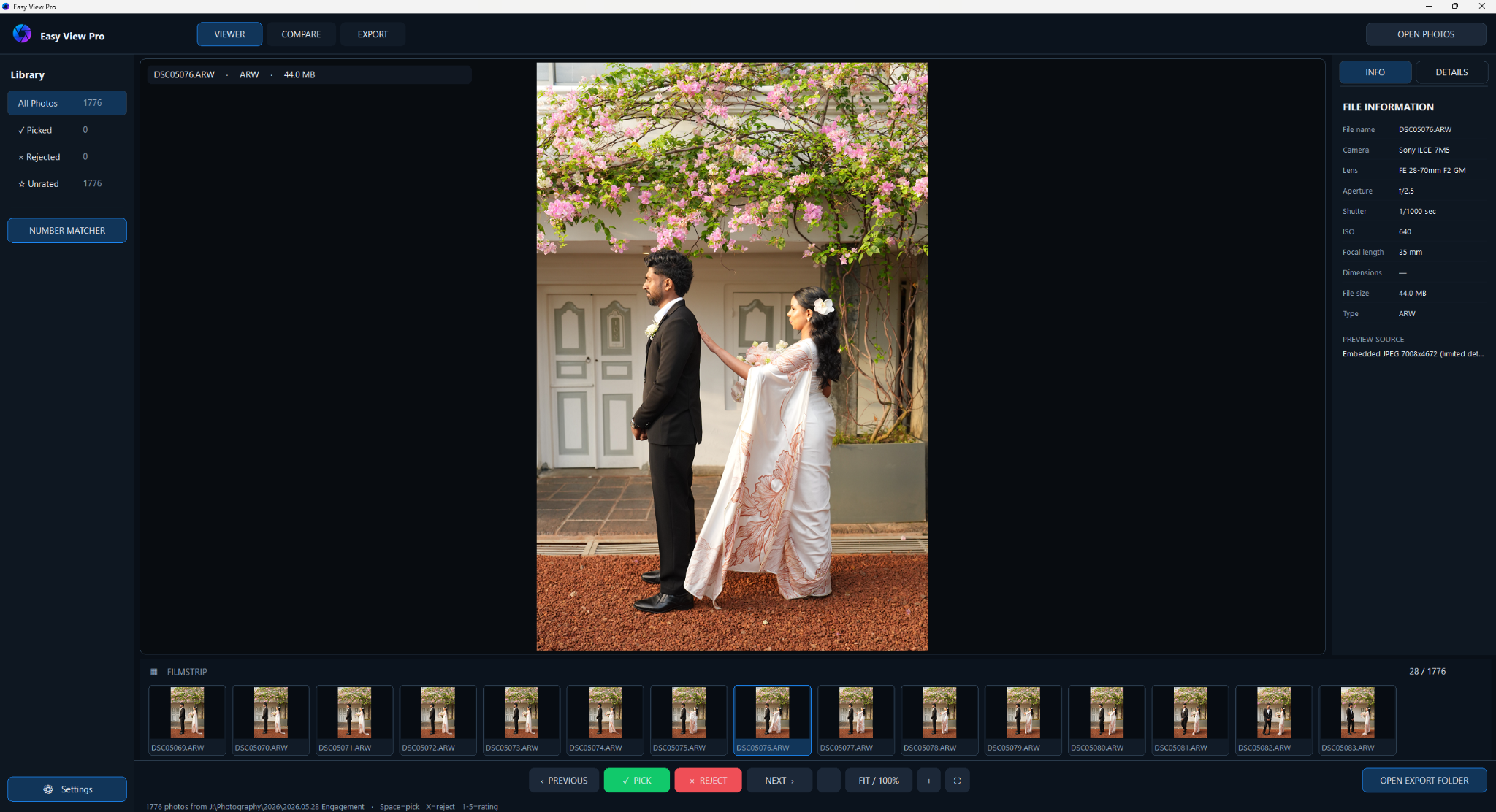
RAW Viewer & Culling
Explore large RAW collections, navigate with keyboard shortcuts, compare frames, and mark picks or rejects in a focused workspace.
Actual Windows app screenshot · Click to view full sizeExplore your RAW photographs, make confident selections, and find the original files behind client-selected JPEGs. Two essential workflows, thoughtfully brought together in Easy View Pro for Windows.
Explore large RAW collections, navigate with keyboard shortcuts, compare frames, and mark picks or rejects in a focused workspace.
Actual Windows app screenshot · Click to view full size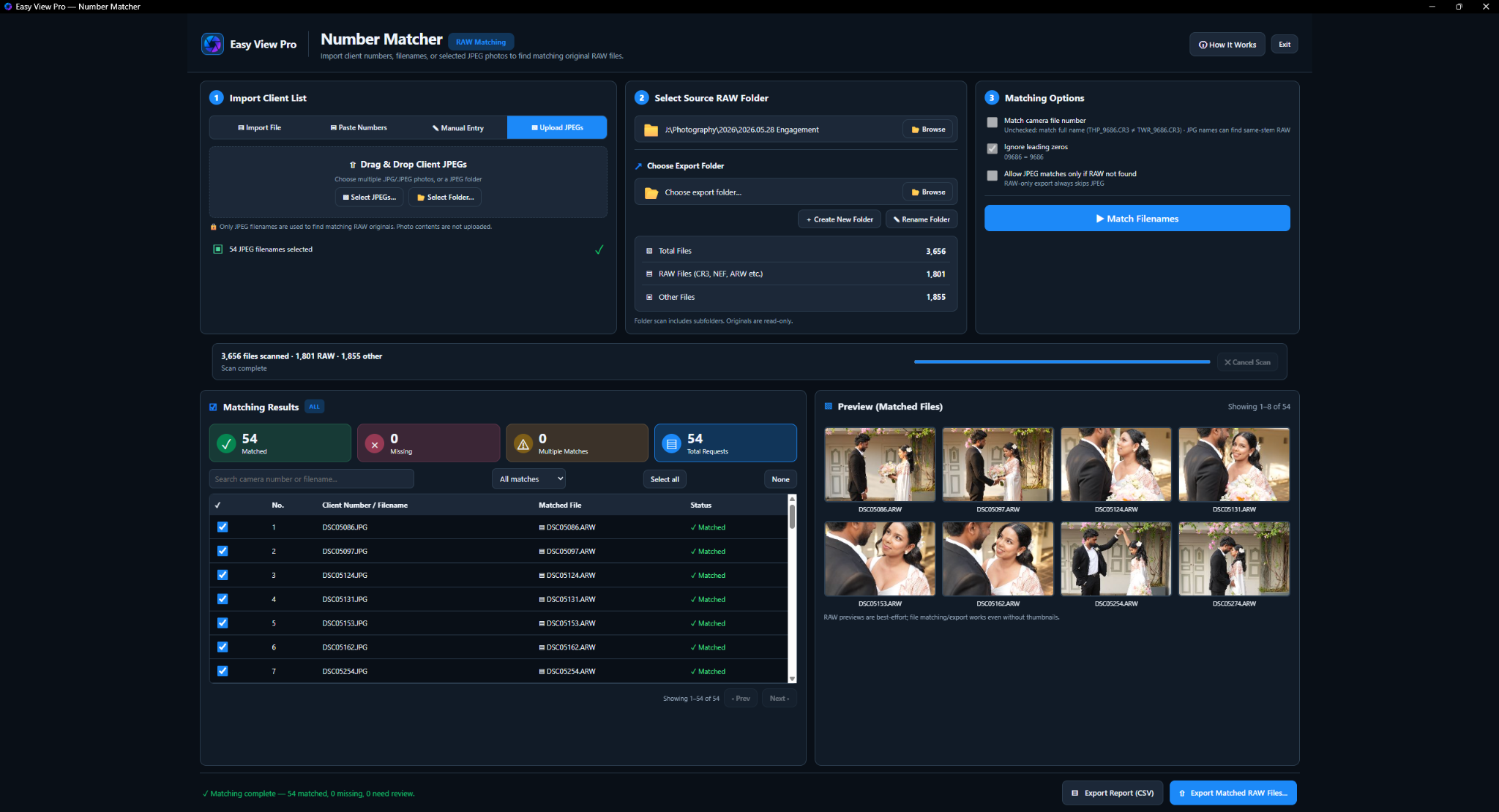
Match client-selected JPEGs, full filenames, or camera numbers to original RAW files. Review missing or duplicate results before verified export.
Actual Windows app screenshot · Click to view full sizeBoth previews are original screenshots from the Windows application, shared with the photographer’s permission. Camera and RAW compression compatibility may vary. Sales are not open yet.
From reviewing wedding and event RAW photos to finding the exact files requested by clients, Easy View Pro brings the two workflows together without unnecessary complexity.
Navigate high-volume RAW sessions with a filmstrip, view photo details, compare frames, mark picks and rejects, and export selected original RAW copies.
Import client-selected JPEG filenames, camera numbers, or DOCX, XLSX, TXT and CSV lists. Find original RAW candidates, review duplicates or missing photos, and export SHA-256-verified copies.
Make selected RAW copies without modifying source files. Copy verification and no-overwrite safeguards help protect your workflow.
Match by exact filename or camera number, review duplicates or missing files, and export approved RAWs into your chosen folder.
From weddings to portraits and events, work with long image lists, RAW previews, metadata, filmstrips and client selection requests.
These are real screenshots of both Easy View Pro workspaces. Switch between them to explore the tools — and click the images above to see every detail.
Actual RAW Viewer & Culling screen, captured in Easy View Pro for Windows. Screenshots are displayed without retouching.
Review your own selections, or start directly with a client’s JPEG favorites. Easy View Pro supports both independent workflows within the same Windows product.
Explore the launch price ↗Open a RAW collection, compare your frames and mark the images you want to keep.
Import client JPEG selections, a document list or pasted camera numbers. Match by original filename or camera number.
Check matched, missing and duplicate results. Export selected original RAW files to a separate destination folder.
We plan a one-time license, not a recurring subscription. Commercial licensing and secure checkout are still being prepared.
One-time purchase, not a subscription
♢ Paddle checkout is not live; no payment is collected
No. The planned price is a one-time $11.99 purchase. The final license and future-update policy will be published before checkout goes live.
Its RAW export workflow is designed to copy original RAW files without converting them to JPEG. We still recommend keeping your camera originals backed up.
Number Matcher supports XLSX, DOCX, TXT and CSV lists, manual entry, and client-selected JPEG filenames. Old .DOC files should be saved as .DOCX before importing.
This website currently focuses on the Windows 10/11 64-bit edition. A separate macOS development project exists but is not part of this planned Windows purchase.
Not yet. The storefront is a launch preview. Verified Paddle payments, secure downloads, licensing and signed Windows releases must be set up before sales start.
The app recognizes common RAW extensions including ARW, CR3, NEF and DNG. Actual full RAW decoding can depend on camera model, compression type and installed Windows support.
From choosing the right frame to finding its original RAW, keep the essential details in focus.
See pricing